SpectraSortStudio

Studio. When you want the controls.

The one-tap tools decide what “best” means. Studio hands that decision to you: which of seven quality axes count, which subjects matter, and how much a subject match should outweigh a sharp frame. Save it as a profile and every sort after that is yours.

Download on the App Store Free · iPhone · iOS 18.5+
Seven quality axes Up to three subjects per sort Included with Premium — $19.99 once
Quality Focus — seven axes

Sharpness for wildlife. Composition for street.

Sharpness, exposure, contrast and noise on the technical side. Composition, color harmony and visual balance on the artistic side. Drag any point on the radar to weight it, or move the Technical / Artistic slider to shift all seven together.
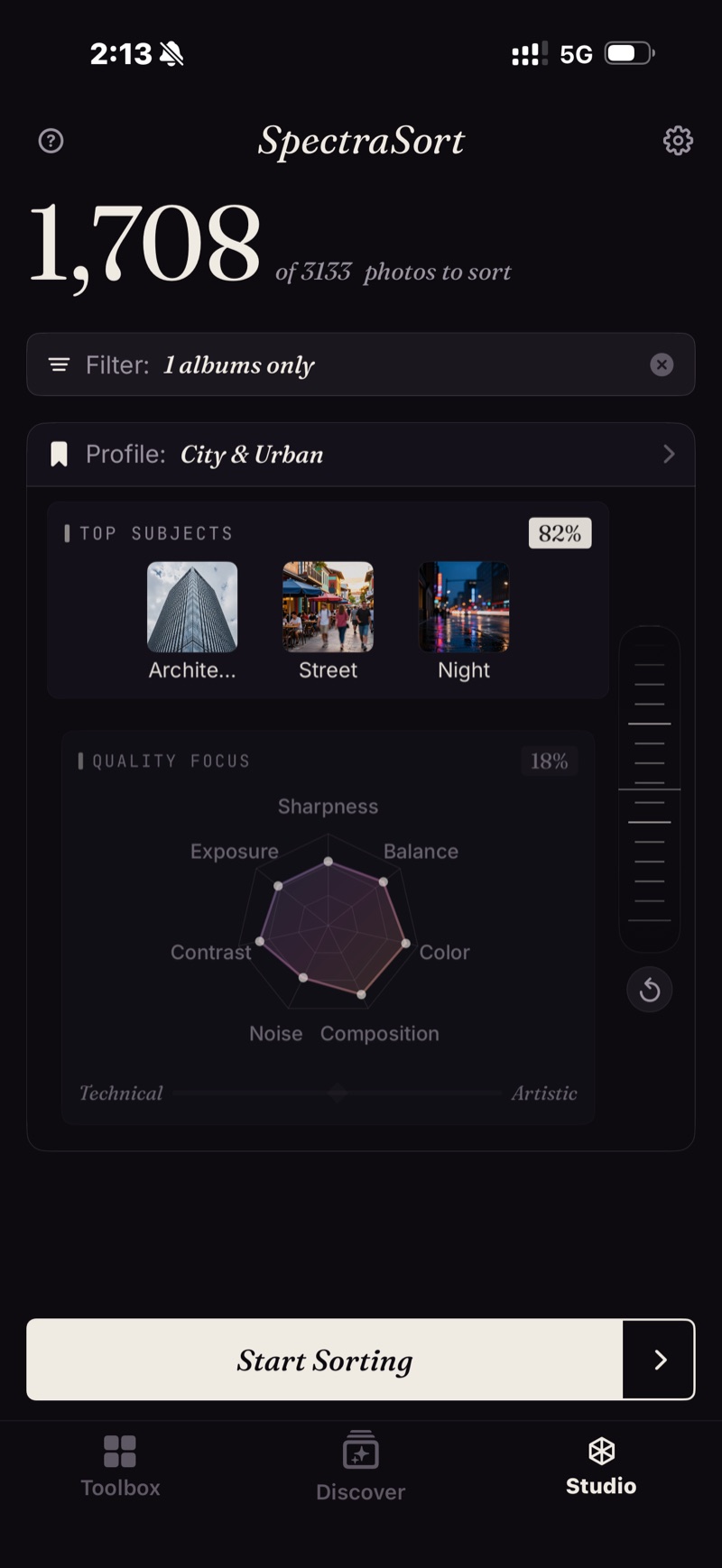
Studio — profile City & Urban: Top Subjects Architecture, Street, Night at 82%; Quality Focus radar with seven axes at 18%; Technical–Artistic slider; the balance wheel on the right
A saved profile, City & Urban: three subjects at 82%, quality at 18%, contrast and color pulled forward.
Subjects and the balance wheel

Subject match against quality.

Up to three subjects in one sort — presets, or anything you can type. The wheel decides how much a match should count. Turn it toward Subjects and a good photo of the right thing wins. Turn it toward Quality and the sharpest, best-composed frame wins, whatever it shows.

Profiles

Set once. Reuse every time.

Bookmark any configuration under its own name and switch between them from the Home screen. Start from Your Taste and adjust it — the app makes a Custom copy, so the learned profile stays intact and keeps learning.

The profile you choose drives every sort, Dedupe and Photos of a location included, so a stack's keeper or a city's best shot is judged by your criteria. The Review grid names the profile that did the sorting.

Pricing

Included with Premium — $19.99 once.

The six one-tap tools are free, five sorts a week. Studio is part of Premium: custom sorts and saved profiles, plus unlimited sorts — one purchase, no subscription.

Download on the App Store
FAQ

Studio questions.

Who is Studio for?
People who shoot a lot and cull on the phone — event and travel work with sharpness and exposure first, noise ignored for the night set. People with a house style the defaults don't capture: color and composition forward, a subject or two pinned. And anyone who simply disagrees with Best Shots and wants the slider set their way, once.
What's the difference between Studio and Best Shots?
Best Shots is one slider: technical on one end, artistic on the other. Studio splits that into seven axes you weight individually, adds up to three subjects and the balance wheel, and lets you save the result as a profile.
Does customizing change my Your Taste profile?
No. Customizing makes a Custom copy; the learned profile stays intact and keeps learning. You can reset or rebuild it from Settings at any time.
Can I sort by subject and quality in the same sort?
Yes — that is what the balance wheel is for. Turn it toward Subjects and a good photo of the right thing wins; turn it toward Quality and the sharpest, best-composed frame wins whatever it shows.
Does a Studio profile apply to Dedupe and location sorts?
Yes. The profile you select drives every sort, so the keeper in a stack or the best shot of a city is judged by your criteria. The Review grid names the profile that did the sorting.
Is Studio free?
Studio is part of Premium — $19.99 once, no subscription. You can open it on the free tier and look; custom sorts and saved profiles need Premium. The six one-tap tools stay free, five sorts a week.

Your best photos. Found.

iPhone, iOS 18.5 or later.

Download on the App Store